 Skan
Receipt scanner apps: which kind do you need?
It depends on what the receipts are for. If you only want a copy you can read later, the scanner built into Files and Notes on the iPhone is free and good enough. If you want the date, total and VAT in a spreadsheet, you need an app that reads the receipt; Skan does that on the iPhone for $1.99, once, without an account. If your employer has an expense service, use its app, since the report has to end up there anyway. Rewards apps such as Fetch are a different deal: you get points, they get your shopping data.
Four kinds of receipt app
“Receipt scanner” covers apps that have little in common except the camera. What sets them apart is what you get back, where the receipts go and who pays for it.
What you get, where it goes, who pays
The iPhone’s own scanner
- What you get
- A PDF: a picture of the receipt
- Where the receipts go
- Your iPhone, or iCloud Drive if you save there
- How it’s paid for
- Free, part of iOS
Files and Notes
Reads the receipt on the phone
- What you get
- Date, total and VAT as a CSV, plus a searchable PDF
- Where the receipts go
- They stay on your iPhone
- How it’s paid for
- One price, paid once
Skan, $1.99 once
Expense service
- What you get
- Claims, approvals and export to the books
- Where the receipts go
- The service’s servers, under your account
- How it’s paid for
- Subscription, usually per user
The one your employer uses
Rewards app
- What you get
- Points you swap for gift cards
- Where the receipts go
- The company’s servers; shared with brands and ad platforms
- How it’s paid for
- Free: you pay with your shopping data
Fetch
If you only need a copy
For a warranty or a return, a readable copy is all you need, and the iPhone makes one without any extra app: open Files, tap the More button, then Scan Documents, and save the PDF in a folder called Receipts. Do it the same week. Most till receipts are printed on thermal paper, and the print fades.
Whether a scan can replace the paper depends on where you live and what the receipt is for. In the US, IRS Publication 583 lets a business keep its records in an electronic storage system and sets out what that system has to do. Elsewhere, ask your accountant before the paper goes in the bin.
The steps, with tips for narrow and crumpled receipts, are in How to scan receipts on iPhone.
If you need the numbers
For an expense claim, a VAT return or your own budget, the picture isn’t the point. You need the date, the shop and the amounts in rows you can add up, and typing those in is the part people put off until the shoebox is full. Before you pick an app for it, check four things:
- What it reads: the total alone, or also VAT, date, shop and currency.
- How you get the numbers out: a CSV opens in Numbers, Excel and Google Sheets, and nearly every accounting program can import one.
- Where the reading happens. If the app needs a connection to read a receipt, the receipt is being sent somewhere.
- How it’s paid for: once, every month, or with ads.
I made Skan for the middle case, someone with a pile of receipts and a spreadsheet. You scan the receipt, Skan reads the total, VAT, date, shop and currency on the phone, and + › Export receipts (CSV) gives you one row per receipt. Each receipt is also kept as a PDF you can search.
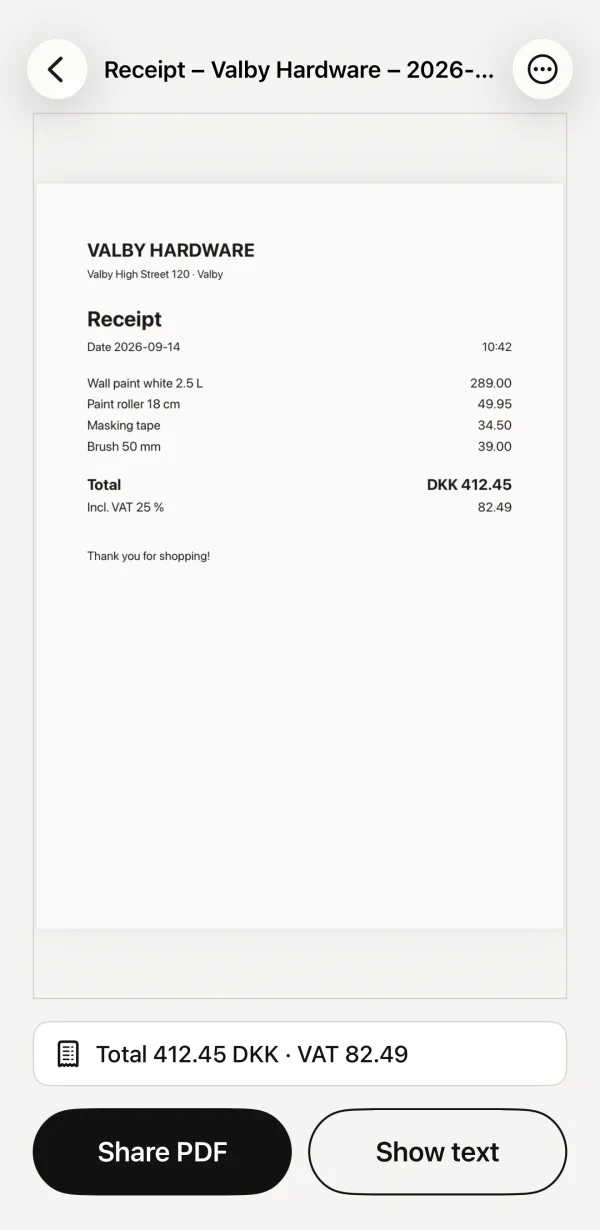 1Named for you: shop and month2Total and VAT, read on the phone
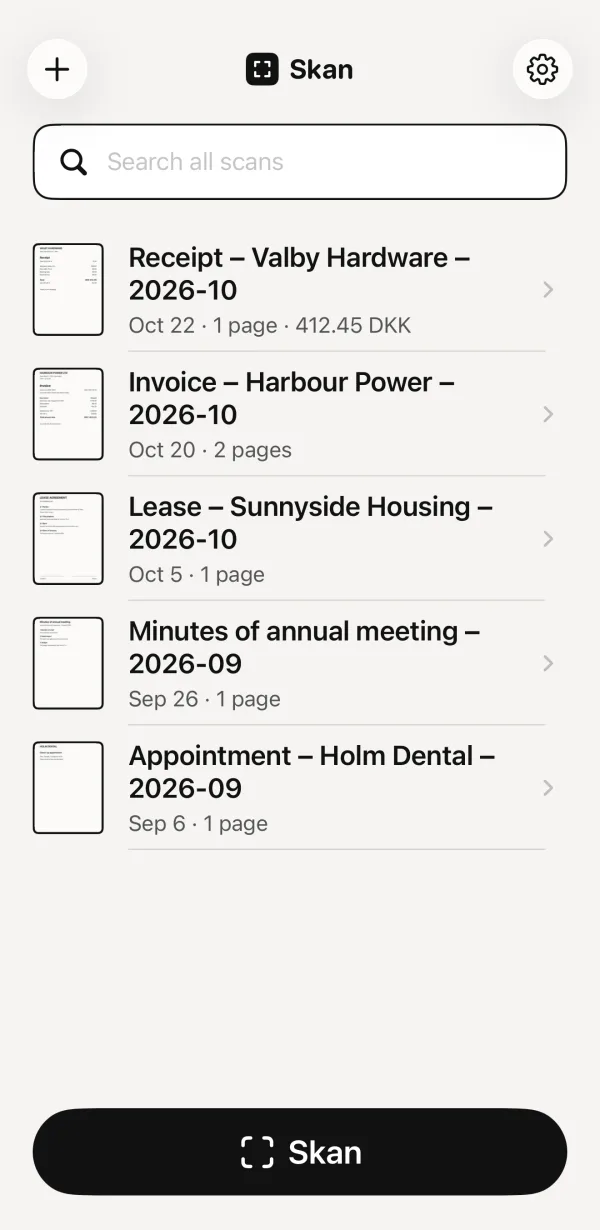 3The amount shows in the list
- Named for you: shop and month
- Total and VAT, read on the phone
- The amount shows in the list
What Skan doesn’t do: it has no categories, no mileage, no approval flow and no link to your bank, and it only runs on iPhone. If you need those, you need an expense service, not a scanner.
Skan costs $1.99, once. No subscription, no account, and its App Store listing says “Data Not Collected”.
What general scanner apps cost
A general scanner app will do for receipts too, if a searchable PDF is all you’re after. Two well-known ones, from their own pages on November 11, 2026:
- Adobe Scan is free to download with in-app purchases, and its App Store listing says scans are automatically saved to Adobe Document Cloud. Premium is listed at $9.99 a month, and the listing mentions raising text recognition from 5 to 100 pages as a paid feature. The privacy label lists identifiers under “Data Used to Track You”.
- Genius Scan has a free Basic plan. Text recognition is part of Ultra, which costs $39.99 a year. The company says recognition runs on the device and documents stay on the phone unless you export them.
Neither is a bad app. Just read the list of in-app purchases before you scan a year of receipts into one of them. We have a longer piece on how free scanner apps earn their money.
See also: Is CamScanner safe to use?
Expense services and rewards apps
If your company uses an expense service, the choice is made: its app sends the receipt straight into your claim, and anything else means entering it twice. Those services keep receipts on their servers under your account. That’s the point of them, since your manager and the bookkeeper have to see them too. They are usually paid per user per month, by the company.
Rewards apps are something else. Fetch describes itself with “Scan receipts, earn gift cards”, and it’s free. Its App Store privacy label lists identifiers under “Data Used to Track You” and, linked to you, your purchases, location and contacts among other things. Its privacy policy says it may disclose your information to brand partners to deliver personalized offers and advertisements. That is the trade, and it’s a fair one if you know about it. It isn’t a filing system, though.
What to check on any App Store listing
- App Privacy. Scroll down to the label. “Data Not Collected” is the short version; “Data Used to Track You” means your activity is matched with data from other companies.
- In-App Purchases. The list shows whether “free” means a weekly or monthly subscription after the first scans.
- Airplane mode. Turn it on and scan a receipt. If the total still shows up, the reading happens on your phone.
- The way out. Check that you can export everything, as PDFs and as a CSV, before you’ve put two hundred receipts in.